Content and tools for a simple and amazing SF HRA benefit experience
Navia hosted a live webinar to ensure you’re prepared to report contributions to Navia. We provided detailed information about this process on the Navia Employer Portal.
Watch Recording!
Annual Reporting Form (ARF)
The OLSE requires businesses in San Francisco to report a summary of their annual compliance via the Annual Report Form (“ARF”). The OLSE usually releases their questionnaire towards the end of March each year. Once the questionnaire is released, it should be available here: Health Care Security Ordinance | San Francisco (sf.gov).
The OLSE provides PDF slides, written instructions and a recorded webinar on their website. Once you have begun the ARF, you will not be able to save and return to it later. Therefore, you may want to download a preview of the ARF questionnaire so you can print out and review the questions before you start the form.
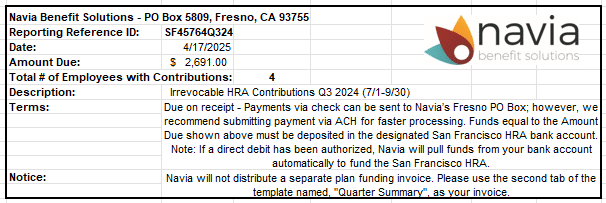
Please note that the 2023 reporting year was the final year in which Navia provided a guide for the ARF. Starting in 2025 (for the 2024 reporting year), clients can find the necessary information on the monthly/quarterly contribution template they send to Navia. This information can be found on the top right-hand corner of the first tab or the second tab of the contribution template. Please see the image below as an example.
2026 Annual Salary Exemption
An employee who is a manager, supervisor, or confidential employee and who earns at or above a salary of $128,861 (annually) or $61.95 (hourly) in 2026 is exempt from coverage under the San Francisco HCSO.
2025 Annual Salary Exemption
An employee who is a manager, supervisor, or confidential employee and who earns at or above a salary of $125,405 (annually) or $60.29 (hourly) in 2025 is exempt from coverage under the San Francisco HCSO.
Contribution Reporting Materials
We highly recommend you read the Contribution Reporting Guides below. This will give you all the information you need to fill out the excel file and how to successfully submit your contributions. To make it easy for you, the Excel file template is linked within the reporting guides below. The link to the file template will be updated as expenditure rates change, so we recommend that you retrieve a fresh file by clicking the link each reporting period to ensure you have the latest copy.
Contribution Reporting Deadline
Contribution reporting is due on the 15th of the month following the reporting period end. To submit your contribution report, log into the Navia Employer Portal, click the Data Management tab, then click Send File.
Quarterly Contribution Reporting
Direct Debit Authorization
To ensure that your irrevocable health care expenditure is made within the City’s mandated timeframe, Navia recommends that you complete our Direct Debit & Credit Authorization Form that allows Navia to debit your bank account within 3 business days following contribution posting.
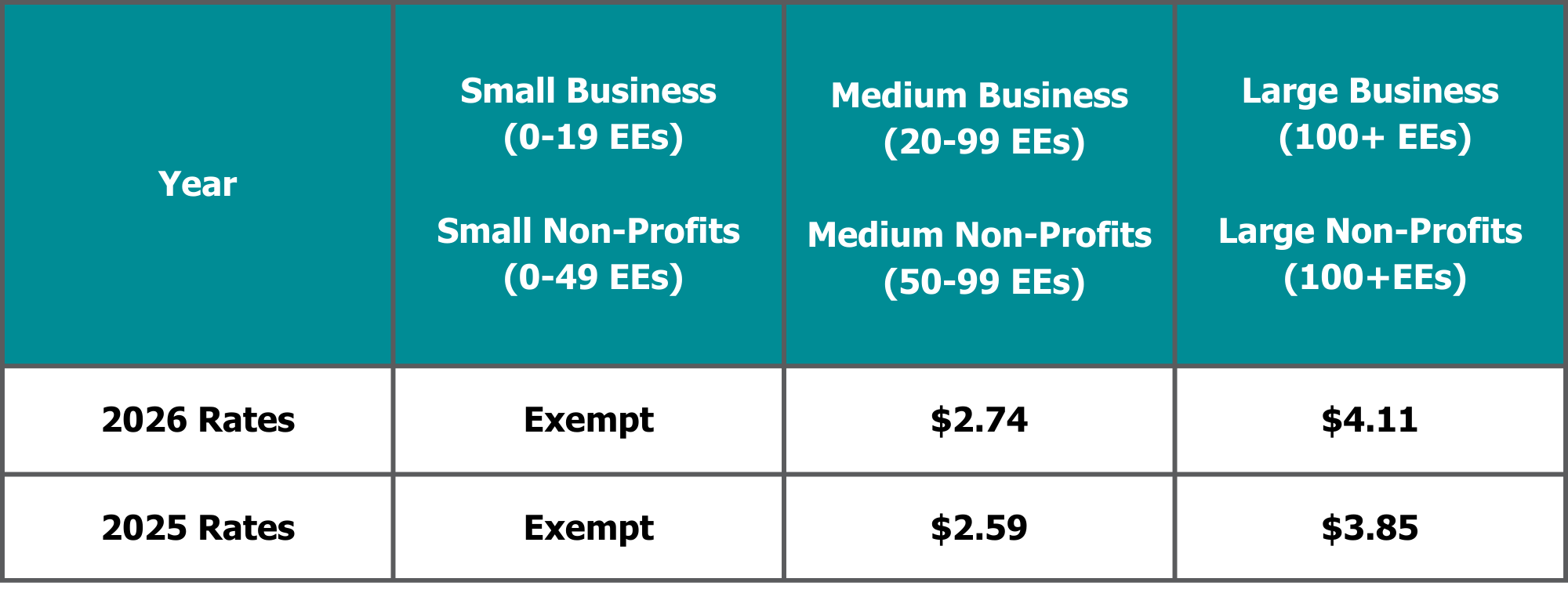
Expenditure Rates
HCSO Waiver
Employees who are enrolled in group health coverage through another employer may request to sign the waiver. Please keep in mind, this is a voluntary waiver, having coverage elsewhere does not automatically exclude the employee from your HCSO expenditure requirement. You must obtain a signed waiver form for every calendar year that the employee wishes to waive SF HRA coverage. Employees have the right to revoke their waiver at any time. Click HERE to download the waiver that best suits your employee population.
Non-Discrimination Testing (NDT)
Navia provides an easy-to-use online Non-Discrimination Testing (NDT) tool for instant testing results. Annual NDT is required by the Internal Revenue Code to ensure that your plan does not discriminate in favor of Key and Highly Compensated Employees. If the plan discriminates in favor of these employees and the failure is not corrected prior to the plan year end, the tax-free benefits of the plan will be lost. By nature, your SF HRA should pass NDT, but it is still required that you complete annual testing.
When Should I Test?
We recommend submitting your Plan End Test two months before the end of each calendar year in the event corrections are necessary.
How Do I Get Started?
To complete the NDT, please login to the Employer Portal and select Plan Management from the left-hand menu, then Nondiscrimination Testing. You may find it helpful to watch this walkthrough video or review our FAQ for tips, insights, and an overview of the online NDT tool.
What If I Don’t Want to Use Navia’s Online NDT Tool?
The fee for manual testing is $600. This process requires additional time and staff to process. Manual tests are also subject to surge pricing of an additional $100 if received after December 5th (for a December 31st plan year end date). If you would still like to move forward with a manual test, click here for the HRA request form. Once you have completed the request form, please email it to [email protected].
What If I have Questions and Need Help?
Review our walkthrough video and FAQ. If you still have questions, please contact us at [email protected] or (425) 452-3488.
2026 Official HCSO Notice
The San Francisco HCSO requires this notice be posted in all workplaces with covered employees.
Summary of Material Modification
The Summary of Material Modifications (SMM) is a document that communicates to benefit plan participants the changes that were made to the most recent version of the Summary Plan Document (SPD). The SMM is created and distributed only when the plan change doesn’t require the SPD to be restated. As an example, an employer who offers a Healthcare FSA may choose to offer the carryover provision instead of the grace period provision. This change would require a SMM and plan participants would be notified of the plan change through the SMM.
How can I find my company’s SMM?
As part of the migration to the Navia platform, an SMM has been drafted outlining the changes made to your HRA. To locate the SMM, please login to the Navia Employer Portal, from the left-hand menu select Resources, Forms and Plan Documents, then filter by Legal Documents. The SMM is located within your Plan Amendment. Please sign the SMM and provide a copy to all plan participants.
Why do employers need to provide the SMM to plan participants?
The Department of Labor (DOL) requires the plan administrator (usually the employer) to automatically distribute certain documents, including the SMM to the plan participants and others who are participating in the plan for example, COBRA participants.
The DOL requires employers to prove the document was distributed. Therefore, employers should document that they did, in fact, distribute the SMM to plan participants. Records indicating the SMM was distributed should be kept with plan records. Employers should retain the proof of distribution for at least eight years.
When should employers distribute the SMM?
Employers are required to distribute the SMM automatically to participants at various times:
- Within 60 days if you make changes to due to a reduction of benefits
- Within 30 days if an employee requests a copy (must provide free of charge)
- Within 210 days after the close of the plan year in which the modification or change was adopted if you make changes to the SMM that are not considered a reduction in benefits
For more information please see the DOL Reporting and Disclosure Guide for Employee Benefit Plans.
SF Essentials Employee Materials
Navia SF HRA Contact Information
Employer Inquiries: [email protected]
Employer Accounting Inquiries: [email protected]
Participant Claim Submission & Inquiries: [email protected]